
Web fiction already has the hard part: characters people care about, chapters that end on pressure, and a world readers return to. What it does not have is a vertical episode machine.
Most AI “adaptations” fail the same way. You paste a chapter into a chat, get a pretty scene, generate again for episode two, and the lead’s haircut has reinvented itself. The plot is still in the novel. The series is not.
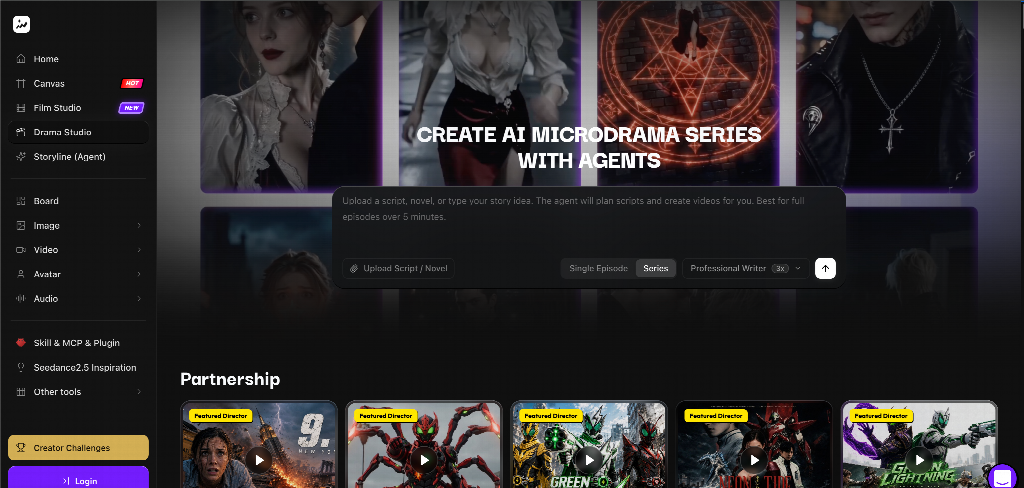
This playbook is about adapting a novel chapter — or a full drama script — into a short vertical episode using a structured drama workbench, not another one-prompt miracle. The product path is Drama Studio: agent planning up front, editable story assets in the middle, storyboards and beat-to-video production after you approve the beats.
It is not a Seedance tutorial and not a Film Studio vs Drama Studio debate. It is an adaptation workflow.
What “adapted” actually means on a phone
A novel chapter can wander. A micro-drama episode cannot.
For vertical series, treat adaptation as compression with memory:
- One episode question the viewer can say out loud
- One relationship move (betrayal, reveal, refusal, deal)
- One location the audience will recognize again
- One unfinished line that forces the next tap
If your adapted episode still feels like “page 47–61 of the book,” you transcribed. You did not adapt.
Why chat-only adaptation breaks by episode three
Chat is great for brainstorming. It is a terrible continuity database.
Typical failure mode:
That is not a creativity problem. It is a records problem. Micro drama needs characters, locations, props, outlines, and beat sheets that survive outside the transcript.
Drama Studio’s product bet is exactly that split: an AI planning conversation to clarify direction, then a workbench that stores editable outlines, episodes, cast, places, props, scripts, and beat sheets so decisions do not evaporate when the chat scrolls away.
The adaptation pipeline (novel → vertical episode)
1. Feed the right source unit
Start with one of these — not the entire novel on day one:
- One chapter with a clean turn
- A short plot outline you already trust
- A drama script scene pack
- A one-line premise only if you accept the agent will invent structure you must review
On Drama Studio, the intake is built for scripts, novels, and story ideas: expand into character setup, episode planning, scene breakdowns, shot-level boards, dialogue / VO / captions, then generated scenes — but only after you keep planning assets connected in one project.
2. Let the agent propose; you approve the adaptation choices
Use the planning agent to answer production questions the novel never asked:
- Which subplot dies for a 60–120 second vertical cut?
- Whose POV owns this episode?
- What becomes the cold open — the fight, the message, the door slam?
- What must stay verbal vs visual?
Do not skip the review. The workbench only helps if you treat agent output as a draft package, not a finished series bible.
3. Lock story assets before any “final” video vanity
Before you fall in love with a generated teaser, create reusable records:
|
Asset |
What to lock |
Why vertical series care |
|
Characters |
Face, wardrobe silhouette, age cue, voice tone |
Viewers recognize cast in under a second |
|
Locations |
Recurring rooms / streets with lighting rules |
Spatial memory = cheaper storytelling |
|
Props |
Ring, contract, phone, key object |
Plot tokens must not morph |
|
Outline / episodes |
Episode question + cliffhanger |
Serialization without improvising structure |
|
Beat sheet |
Ordered emotional moves |
Stops “pretty but plotless” scenes |
This is the difference between a project and a pile of MP4s.
4. Storyboard the episode as panels, not vibes
Turn approved scenes into multi-panel boards so shot order is visible before generation burns credits. Check:
- Does the open hook land in panel 1–2?
- Is the reveal readable without novel narration?
- Does the last panel withhold something?
Bring board outputs and any image / video / audio results back into the same production path instead of downloading into a mystery folder.
5. Produce beat-to-video only after beats are approved
Open approved beats in production with prompt edits, reference assets, versioning, continuation, and export. Generate for the beat you locked — not for a new reinterpretation of the chapter every time.
A verified Drama Studio project path (their “The Fight I Owe You” demo shape) runs agent planning → structured outline → characters / locations / props → an eight-beat episode → storyboards → production → teaser. Steal the stage gates, even if your story is nothing like that title.
Adaptation rules that keep novel fans from rioting
Keep the motive; cut the travelogue. Readers forgive missing scenery. They do not forgive a soft protagonist.
Translate interior monologue into visible conflict. If the chapter is 800 words of thinking, invent a confrontation that proves the same change.
Protect proper nouns. Names, titles, and signature props should live in asset records, not only in prose prompts.
Design the binge hinge. End on a choice, accusation, or arrival — something that makes “Next episode” feel necessary, not polite.
Ship a pilot episode, not a season bible novelization. One strong adapted episode teaches you more than twelve unfinished outlines.
A one-afternoon checklist
Who this workflow is for
- Fiction writers adapting their own web novel into vertical episodes
- Short-drama teams turning scripts into production packages
- Solo creators who outgrew chat-thread “series”
- Anyone who needs planning, story assets, boards, and episode video versions in one project instead of five apps
If you only need a single cinematic one-off with camera coverage language, that is a different studio lane. If you need serialized pressure from text you already wrote, Drama Studio is the adaptation desk.
Bottom line
Novels give you story mass. Vertical micro drama needs story memory.
Stop asking a chat window to remember your cast across twenty episodes. Put the adaptation into a workbench: plan with an agent, lock characters and places, board the beats, then generate episode video from approved cards.
Start that path in Topview Drama Studio with one chapter you already love — and judge success by whether episode two still looks like the same show.